Importing images on combinations
You can import images directy onto your combinations, whether when creating combinations, or simply adding images to combinations already present in your catalog.
We’re going to see both cases in this article.
I’m creating new combinations
The format of your file will indicate the product name, combination attributes, image urls, and any other information you wish to add to your combinations (reference, ean13, price, etc.).
In the example below, we will create colour for the hat and colour + size for the socks: one line per variation. On each of the combination lines, we indicate the corresponding image to be associated with that combination.
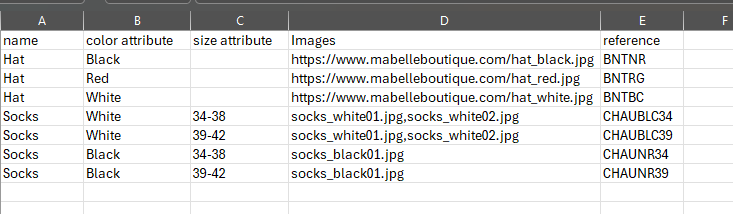
For the hat, images are stocked on a specific url
For the socks, images are stocked in Sc’s directory /modules/storecommander/import/images
For the white socks, two images files, separated by a comma
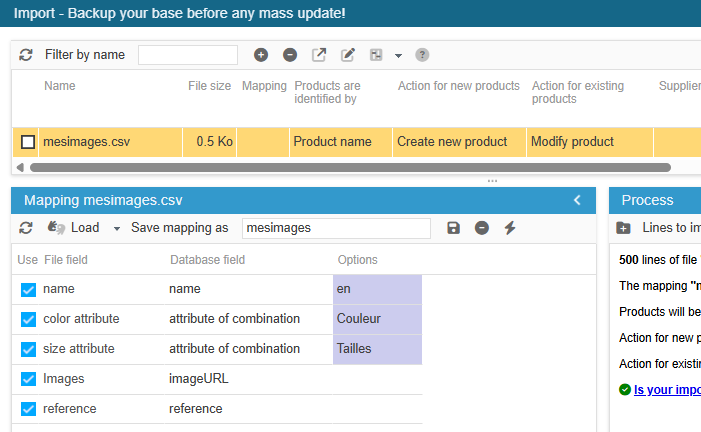
The configuration for this import will be:
I’m modifying existing combinations
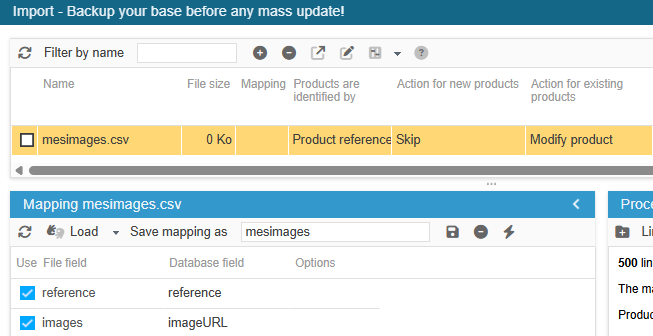
Here, we are going to modify the combinations, to add their images, so it is necessary to use the combination identifier, such as: id_product_attribute, reference, ean13
This identifier is a key point, as it must be unique for the import process is to modify the right product or combination.
In the below example, we are using the combination references onto which we’ll add the images.
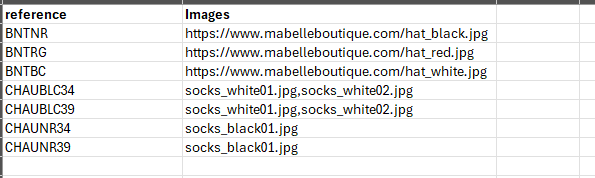
For the first 3 references, images are stocked on a specific url sont stockées sur une url spécifique.
For the last 4 references, images are stocked in Sc’s directory /modules/storecommander/import/images
For CHAUBLC34 et CHAUBLC36 references , 2 images which names are separated by a comma
The configuration for this import will be: