Combinations Grid: Adding a field from a table outside the combinations table
Instructions for adding a column to the combinations grid, indicating the value of a field located in a table external to the product tables
Access the PRO section of the tool to add custom fields:
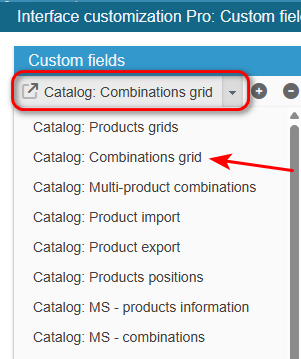
Ensure you select the right grid : ‘Catalog: Combinations grid’:
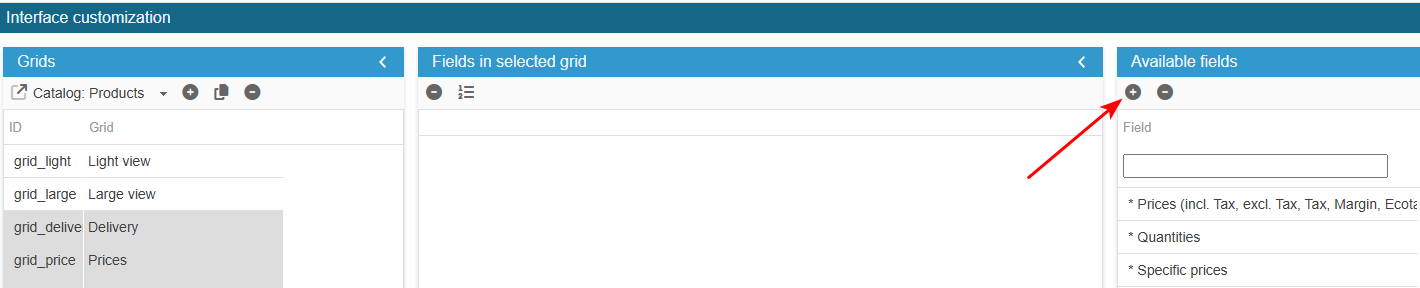
To add the field to the list of available fields for your products grids, click on the in the 'Add a field' panel and enter the following information:
What is the field ID?: label_bio (should be exactly the name as it is in the database).
SC creates the field, you now need to populate the grid with:
From the Advanced Properties panel on the right handside:
- select the menu SQLSelect and enter:
return ' ,lab.label_bio';- select the menu SQL Left Join and enter:
return ' LEFT JOIN '._DB_PREFIX_.'label lab ON (lab.id_product_attribute = pa.id_product_attribute) ';- select the menu PHP definition and enter:
$combArray[$combinaison['id_product_attribute']]['label_bio'] = $combinaison['label_bio'];- select the menu PHP onAfterUpdateSQL and enter:
if (isset($_POST['label_bio']))
{
    $the_id = (int) Db::getInstance()->getValue('SELECT id_product_attribute
                                                    FROM '._DB_PREFIX_.'label
                                                    WHERE id_product_attribute = '.(int) $id_product_attribute);
    if ($the_id)
    {
        $sql = 'UPDATE '._DB_PREFIX_.'label
                SET label_bio = '.(int) Tools::getValue('label_bio', 0).'
                WHERE id_product_attribute='.(int) $id_product_attribute;
    }
    else
    {
        $sql = 'INSERT INTO '._DB_PREFIX_.'label (`id_product_attribute`,`label_bio`)
                VALUES ('.(int) $id_product_attribute.', '.(int) Tools::getValue('label_bio', 0).')';
    }
    Db::getInstance()->execute($sql);
}
- to add a yes/no choice, select the menu List of choices and enter:
return [1 => _l('Yes'), 0 => _l('No')];Exit the editing window.
The new field is now present in the list of available fields and you can add it to your combinations grid.