Product duplication, a mechanism to create faster
What is the point of duplicating products?
Save time when creating similar products
If you sell similar products (e.g. t-shirts in different colours, similar designs, etc.), you don't need to recreate everything. Just duplicate, change a few fields and you're ready to go!
Keep a consistent structure
Descriptions, categories, prices, images, SEO, attributes, etc., are copied → you keep a uniform layout and presentation.
Reduce manual errors
Less copying and pasting, so less risk of forgetting fields or misconfiguring a product.
Create a base for product variants
Even if you don't want to use variations, you can create several "independent" products from an initial model (e.g. limited editions, derivative packs, etc.).
Test alternative versions
Useful for testing different descriptions, prices or visuals on a very similar product (for manual A/B testing).
⚠️ Good to know: The duplicated product is created deactivated by default (not visible in the shop) → you can modify it at your leisure before publishing it.
How to duplicate products within Store Commander?
Store Commander allows you to duplicate several products using this icon located on the Products panel toolbar.
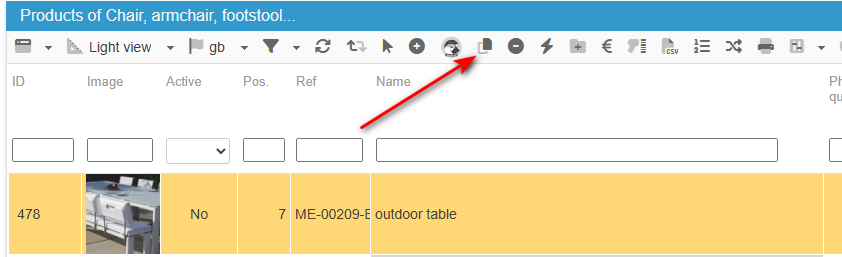
You can duplicate as many products as you wish in a single action simply by setting up the maximum of products you wish to duplicate in Tools > Settings > Maximum.
Note that the duplication is a PrestaShop process. If for any reason the duplication does not work or some elements are not duplicated during the process, then please refer to PrestaShop documentation on the duplication option.